
Introduction
The modern internet feels incredibly fast. Websites load in seconds, videos stream instantly, and complex web applications behave almost like native software installed on a computer or smartphone. From online shopping platforms to cloud-based productivity tools, users now expect seamless and instant digital experiences.
However, the early web was very different. In the 1990s and early 2000s, websites were significantly slower. Loading a single webpage often took several seconds, and sometimes even minutes on slow connections. Networks were limited, servers were less powerful, and early web protocols were not designed for efficiency.
As the internet grew and user expectations increased, engineers and researchers began developing technologies to improve performance. These innovations addressed multiple aspects of web delivery, including how data travels across networks, how content is stored and cached, and how browsers process and render web pages.
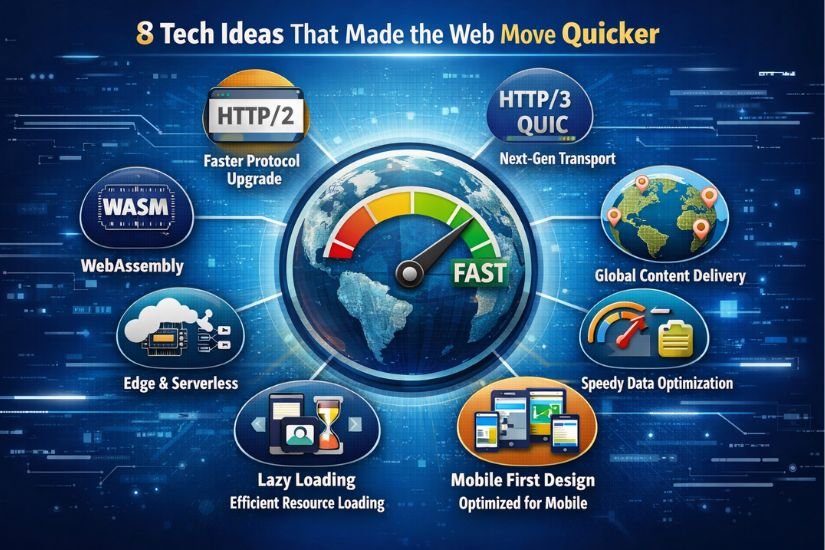
Technologies such as Content Delivery Networks (CDNs), web caching, data compression, modern HTTP protocols like HTTP/2 and HTTP/3, asynchronous web applications, and advanced browser engines have dramatically improved the speed and efficiency of the internet.
This article explores the key technological ideas that made the web faster. It explains how these systems work, how they interact with one another, and why they are essential for modern web performance.
Why Early Websites Were Slow
To understand how the web became faster, it is important to examine the challenges that existed in the early internet.
Several technical limitations affected performance during the early days of the web.
Limited Network Infrastructure
In the early years of the internet, network infrastructure was not as advanced as it is today. Dial-up connections, which were common in the 1990s, had speeds as low as 56 kbps. At these speeds, downloading even small images or scripts could take noticeable time.
Centralized Servers
Most websites were hosted on a single server located in one geographic region. If a user in Asia attempted to access a server located in North America, the data had to travel across long distances through multiple network nodes. This increased latency and slowed down page loading.
Inefficient Web Protocols
Early versions of the HTTP protocol were simple but inefficient. HTTP/1.0 and HTTP/1.1 required multiple connections to retrieve different components of a webpage, such as images, stylesheets, and scripts. This process added extra network overhead and increased loading time.
Large and Unoptimized Files
Web developers initially focused more on design and functionality rather than performance. As websites became more visually complex, page sizes increased significantly due to large images, scripts, and multimedia content.
Sequential Resource Loading
Browsers in earlier years often loaded resources sequentially rather than simultaneously. This meant that each file had to be downloaded one after another, increasing the time required to render a webpage.
Because of these limitations, engineers began searching for ways to improve how web content was delivered and processed.
Key Technologies That Made the Web Faster
Over time, developers introduced several important technologies that transformed web performance.
These technologies focus on different aspects of web delivery:
- Reducing network latency
- Decreasing file sizes
- Delivering content closer to users
- Optimizing browser rendering
- Improving server efficiency
Some of the most influential technologies include:
- Content Delivery Networks (CDNs)
- Web caching systems
- Data compression techniques
- Advanced HTTP protocols
- Asynchronous web technologies
- Browser performance improvements
- Edge computing infrastructure
Together, these technologies form the foundation of modern web performance optimization.
Content Delivery Networks (CDN)
One of the most significant innovations that improved web speed is the Content Delivery Network, commonly known as a CDN.
A CDN is a distributed network of servers located in multiple geographic regions around the world. Instead of delivering website content from a single origin server, a CDN stores cached copies of web assets across many edge servers.
These assets typically include:
- Images
- CSS stylesheets
- JavaScript files
- Fonts
- Videos
- Static HTML files
When a user visits a website that uses a CDN, the system automatically delivers the content from the nearest edge server rather than the origin server.
How CDNs Improve Performance
CDNs improve website performance in several ways.
First, they reduce latency by decreasing the physical distance between users and servers. If a website is hosted in the United States but a user is located in Europe, the CDN can deliver the content from a European edge server.
Second, CDNs distribute traffic across multiple servers, preventing individual servers from becoming overloaded during periods of high demand.
Third, CDNs provide intelligent caching mechanisms that store frequently accessed files close to users.
CDN Architecture Example
User Request
     ↓
Nearest CDN Edge Server
     ↓
Cached Content Response
     ↓
User Browser
If the edge server does not already have the requested content cached, it retrieves the data from the origin server and stores it for future requests.
Real-World CDN Providers
Many of the largest websites in the world rely on CDN infrastructure. Popular CDN providers include:
- Cloudflare
- Akamai
- Fastly
- Amazon CloudFront
- Google Cloud CDN
These networks operate thousands of servers worldwide to ensure fast and reliable content delivery.
Web Caching
Caching is another fundamental technology that significantly improves web performance.
Caching refers to the process of storing frequently used data so that it can be reused quickly without needing to retrieve it from the original source every time.
When a webpage is loaded, many of its assets remain unchanged for long periods. Instead of downloading these assets repeatedly, caching allows the browser or server to reuse previously stored copies.
Types of Web Caching
Browser Caching
Browser caching stores files locally on a user’s device. These files may include images, CSS stylesheets, JavaScript files, and fonts.
When a user revisits the website, the browser loads these files directly from the local cache rather than requesting them again from the server.
Server-Side Caching
Server caching stores pre-generated versions of webpages. Instead of dynamically generating the same page repeatedly, the server can quickly deliver cached content.
CDN Edge Caching
CDNs also implement caching by storing website assets on edge servers near users. This reduces the need for repeated requests to the origin server.
Caching reduces network traffic, decreases server load, and significantly speeds up page loading times.
Data Compression
Web pages consist of multiple types of files, including HTML documents, CSS stylesheets, JavaScript code, fonts, and images. These files can become quite large if they are not optimized.
Data compression techniques reduce the size of these files before they are transmitted over the network.
Smaller files travel faster across the internet, which improves loading speed and reduces bandwidth usage.
Common Compression Methods
Two widely used compression algorithms are:
Gzip
Gzip has been used for many years to compress web content. It reduces file sizes by identifying repeating patterns in data and encoding them more efficiently.
Brotli
Brotli is a more modern compression algorithm developed by Google. It typically achieves higher compression ratios than Gzip, making files even smaller.
Modern web servers often use Brotli compression when supported by browsers.
HTTP Protocol Evolution
The Hypertext Transfer Protocol (HTTP) is the foundation of data communication on the web. Over time, new versions of HTTP have been developed to improve performance.
HTTP/1.1 Limitations
HTTP/1.1 required multiple TCP connections to load webpage resources. Each connection added overhead and increased latency.
Additionally, the protocol suffered from a problem known as head-of-line blocking, where one slow request could delay others.
HTTP/2 Improvements
HTTP/2 introduced several important features that significantly improved web performance.
These features include:
- Multiplexing
- Header compression
- Request prioritization
- Server push
Multiplexing allows multiple requests and responses to be transmitted simultaneously over a single connection. This reduces the need for multiple network connections.
HTTP/3 and QUIC
HTTP/3 is the latest version of the HTTP protocol and is built on the QUIC transport protocol, which operates over UDP instead of TCP.
This change provides several performance benefits.
- Faster connection establishment
- Reduced latency
- Improved packet loss recovery
- Better performance on unstable networks
Major browsers such as Chrome, Firefox, and Edge already support HTTP/3.
Asynchronous Web Technologies
Asynchronous web technologies allow web applications to communicate with servers without reloading the entire page.
One of the earliest examples of this concept is AJAX (Asynchronous JavaScript and XML).
Instead of refreshing the entire webpage, asynchronous requests allow specific sections of a page to update dynamically.
Benefits of Asynchronous Web Applications
- Reduced data transfer
- Faster user interactions
- Smoother user experience
- Improved application responsiveness
Modern frameworks such as React, Angular, and Vue heavily rely on asynchronous communication with backend APIs.
Frontend Performance Optimization
Developers use many optimization techniques to improve the performance of front-end code.
Common Techniques
- Minifying JavaScript and CSS
- Compressing images
- Lazy loading images and videos
- Code splitting
- Reducing render-blocking resources
For example, lazy loading ensures that images are only loaded when they appear in the user’s viewport.
This reduces the initial page load time.
Modern Browser Engines
Web browsers have also evolved significantly.
Modern browsers use powerful rendering engines that process HTML, CSS, and JavaScript efficiently.
Examples include:
- Google Chrome — Blink / V8
- Firefox — SpiderMonkey
- Safari — WebKit
These engines perform several tasks simultaneously, including:
- Parsing HTML
- Applying CSS styles
- Executing JavaScript
- Rendering the page layout
Advanced optimization techniques such as parallel processing and intelligent caching allow browsers to render complex pages quickly.
Edge Computing and Serverless Architecture
Edge computing moves computation closer to users.
Instead of relying entirely on centralized data centers, edge infrastructure processes data on servers located near users.
This reduces latency and improves responsiveness.
Serverless architecture also contributes to performance improvements by allowing applications to run scalable functions on demand without maintaining traditional servers.
Popular platforms include:
- AWS Lambda
- Cloudflare Workers
- Google Cloud Functions
WebAssembly and High-Performance Web Applications
WebAssembly (WASM) allows developers to run high-performance code directly in the browser.
It enables programming languages such as C, C++, and Rust to compile into a format that browsers can execute efficiently.
This makes it possible to run complex applications inside the browser, including:
- 3D graphics software
- Video editing tools
- Computer-aided design applications
- Advanced games
WebAssembly significantly expands the capabilities of web applications.
Why Web Speed Matters for Businesses
Website performance has a direct impact on business outcomes.
Research consistently shows that slow websites lead to poor user experiences and lost revenue.
Important factors affected by web speed include:
- Search engine rankings
- Conversion rates
- User engagement
- Customer satisfaction
Even a one-second delay in page loading can significantly reduce conversions for e-commerce platforms.
Because of this, companies invest heavily in web performance optimization.
How These Technologies Work Together
Modern web performance is the result of multiple technologies working together.
The process typically looks like this:
User opens website
        ↓
DNS resolves domain
        ↓
Request reaches CDN
        ↓
Cached content delivered
        ↓
HTTP/3 transfers data efficiently
        ↓
Browser renders optimized code
        ↓
Page loads quickly
Each step in this process contributes to reducing latency and improving performance.
The Future of Web Performance
Web performance technologies continue to evolve.
Several emerging technologies are shaping the future of faster web experiences.
These include:
- Edge computing networks
- Artificial intelligence for performance optimization
- 5G network infrastructure
- WebGPU for advanced graphics
- Improved QUIC protocols
As these innovations mature, web applications will become even faster and more capable.
Conclusion
The web did not become fast by accident. It is the result of decades of technological innovation aimed at improving how data is delivered, processed, and rendered.
Technologies such as Content Delivery Networks, caching systems, data compression, modern HTTP protocols, asynchronous communication, browser optimization, and edge computing have dramatically improved the performance of websites and web applications.
Together, these systems allow the modern internet to deliver fast, reliable, and responsive experiences to users around the world.
As new technologies continue to emerge, the web will likely become even faster, enabling richer and more immersive digital experiences.
FAQs About Technologies That Made the Web Faster
What technology improved web speed the most?
Content Delivery Networks and caching systems are among the most impactful technologies because they store content closer to users and reduce network latency.
Why are modern websites faster than older websites?
Modern websites use optimized protocols, advanced compression techniques, CDN infrastructure, and powerful browser engines that improve efficiency.
What is caching in web performance?
Caching stores frequently used files locally or on nearby servers so they can be loaded instantly instead of being downloaded repeatedly.
How does HTTP/3 improve web performance?
HTTP/3 uses the QUIC protocol, which reduces connection setup time and improves packet loss recovery, leading to faster and more reliable connections.
Will the internet continue to become faster?
Yes. New technologies such as edge computing, 5G networks, and AI-driven optimization continue to improve web performance.














Leave a Reply